
Table of Contents
- Why Heated Gloves Stop Working: Common Causes
- How to Test Heated Glove Battery Voltage
- Signs of Faulty Heated Glove Heating Elements
- Heated Glove Battery Maintenance Tips
- DIY Repairs vs. Professional Service
- Storage and Long-Term Care Protocols
- When to Replace Your Heated Gloves
- Frequently Asked Questions
Last Updated: September 20, 2026
Why Heated Gloves Stop Working: Common Causes
Heated gloves are brilliant for winter, but they can fail suddenly when you need them most. Understanding why heated gloves stop working helps you fix problems fast and avoid costly replacements.
The most common culprits are battery issues, damaged heating elements, faulty connectors, and moisture damage. Each has distinct warning signs. Some problems you can fix yourself. Others need professional repair.
Mind Smart's rechargeable heated gloves are engineered to last, but like all battery-powered gear, they require proper care. The good news: most failures are preventable with basic maintenance.

Here are the main reasons why heated gloves stop working:
- Battery failure, the battery no longer holds charge or dies too quickly
- Heating element damage, broken wires inside the glove disrupt heat output
- Corroded connectors, oxidation blocks power flow between battery and glove
- Loose connections, vibration or wear loosens the charging port
- Water damage, moisture inside the glove shorts the circuit
- Faulty charging cable, the cable doesn't deliver power to the battery
- Worn thermal elements, heat dissipation decreases after repeated heating cycles
- Controller failure, the thermostat or circuit board malfunctions
The heating elements in modern gloves like Mind Smart's are watertight by design, but connectors and battery terminals remain vulnerable. Moisture ingress at the charging port is one of the most frequent failure points.
How to Test Heated Glove Battery Voltage
Testing battery voltage is the fastest way to diagnose why your heated gloves stop working. A simple multimeter check tells you if the battery is dead, dying, or still functional.
What you'll need:
- Digital multimeter (available from any hardware shop, around £10-20)
- Your heated gloves and charging cable
- A safe, dry workspace
Step 1: Charge the gloves fully [Time: 2-3 hours]
Connect your gloves to a power source using the original charging cable. Let them charge completely. A full charge is essential for an accurate voltage test.
Step 2: Locate the battery terminals [Time: 2 minutes]
Remove the battery from the glove if it's removable, or identify the charging port connectors. Most heated gloves have a small connector with two or three metal pins. These are your test points.
Step 3: Set your multimeter to DC voltage [Time: 1 minute]
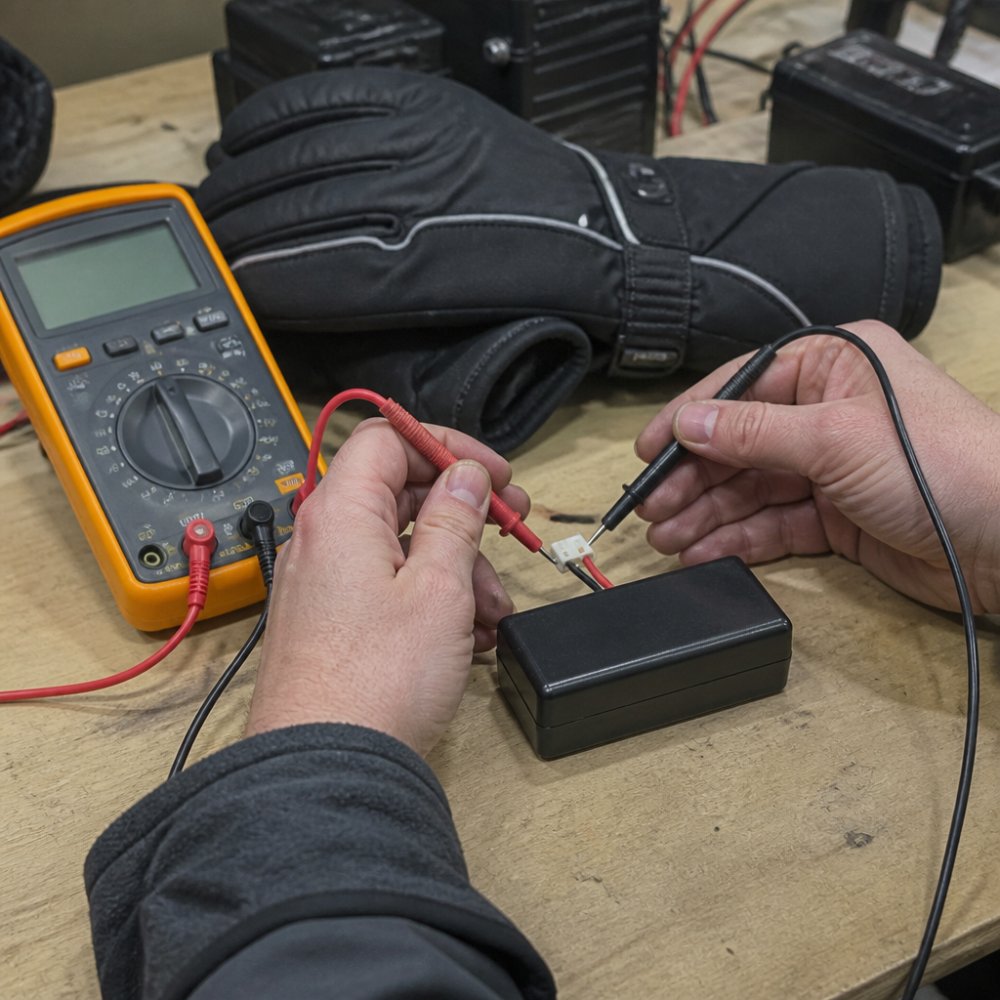
Turn the dial to the DC voltage setting (marked with a V with a straight line). Select a range that matches your battery's rated voltage. Most heated glove batteries are 3.7V or 7.4V lithium-ion cells.
Step 4: Test the voltage [Time: 2 minutes]
Touch the red probe to the positive terminal and the black probe to the negative terminal. Read the voltage display. A healthy battery shows within 0.3V of its rated voltage. A battery reading below 80% of its rated voltage is failing.
What the readings mean:
| Battery Voltage Reading | Condition | Action |
|---|---|---|
| 95-100% of rated voltage | Healthy | Gloves should work normally |
| 80-94% of rated voltage | Degrading | Battery will fail soon; plan replacement |
| 60-79% of rated voltage | Failing | Battery won't hold charge; replace immediately |
| Below 60% of rated voltage | Dead | Battery is unusable; needs replacement |
A voltage drop from full charge to 50% within a few hours indicates battery degradation. Lithium-ion batteries lose capacity over time, especially after 300+ charging cycles.
Signs of Faulty Heated Glove Heating Elements
Heating elements are the wires inside your gloves that generate warmth. When they fail, your gloves won't heat at all, or they'll warm unevenly.
Faulty heating elements show these warning signs:
- No heat on one hand, one glove stays cold while the other works
- Weak, patchy warmth, heat comes from only part of the glove
- Heat stops after a few minutes, thermal regulation kicks in too early
- Burning smell, indicates wire damage or insulation failure
- Visible damage, tears, cracks, or discolouration on the glove surface
The heating elements in Mind Smart gloves cover the full hand and fingertips with watertight construction. If you notice heat only in the palm but not the fingers, a heating wire has likely broken due to thermal fatigue or repeated bending.

How heating elements fail:
Thermal fatigue is the main cause. Each heating cycle expands and contracts the wire. Over time, this stress causes micro-fractures. The wire eventually breaks completely, cutting off heat to that section.
Moisture can also damage heating elements. Water seeping past the connector corrodes the wire insulation. This creates a short circuit that trips the safety shut-off.
Mechanical damage is less common but happens if you bend the glove sharply or apply pressure to the heating zone. The wire inside breaks at the stress point.
Testing for element failure:
Feel both gloves after 5 minutes of use. A working glove should be warm across the entire hand surface. Cold spots or complete lack of warmth on one glove means the heating element is damaged.
If only one glove fails, the battery and charging system are likely fine. The problem is isolated to that glove's heating circuit.
Mind Smart l Rechargeable Waterproof →
Heated Glove Battery Maintenance Tips
Your battery is the heart of your heated gloves. Proper maintenance extends its lifespan and prevents sudden failure.
Charge regularly but don't overcharge
Charge your gloves after every use, even if you only wore them for 30 minutes.
Store in a cool, dry place
Avoid water damage
Monitor charging cable condition
Replace the battery every 2-3 years
DIY Repairs vs. Professional Service
When your heated gloves stop working, you face a choice: fix them yourself or send them for professional repair.
When DIY repair makes sense:
Simple fixes are worth attempting yourself:
- Cleaning corroded connector pins with a dry cloth or fine sandpaper
- Tightening a loose charging port by gently pushing the connector fully home
- Replacing a damaged charging cable (if a replacement is available)
- Testing battery voltage to confirm the battery is the problem
When to stop and seek professional help:
Do not attempt these repairs yourself:
- Soldering broken heating wires inside the glove, requires precision tools and risks further damage
- Opening the glove to access internal components, breaks waterproof seals and voids warranties
- Replacing the heating element, needs specialist knowledge of thermal conductivity and insulation
- Repairing circuit board or controller failure, requires electronics expertise
Cost comparison:
Finding professional repair:
Storage and Long-Term Care Protocols
How you store your gloves during off-season directly affects how long they last. Proper storage prevents battery degradation, moisture damage, and material breakdown.
Before storing for winter or extended periods:
- Clean the gloves with a soft, damp cloth to remove salt, dirt, and sweat
- Dry them completely, especially the charging port and connector area
- Charge the battery to 50%, not full, not empty
- Store at room temperature (15-20°C) in a dry location
- Keep away from direct sunlight, heat sources, and extreme humidity
Storage container tips:
Check gloves monthly during storage:
Seasonal maintenance:
When to Replace Your Heated Gloves
Knowing when to replace your gloves saves you from relying on failing gear in cold conditions.
Replace when:
- The heating elements no longer work and professional repair costs exceed 40% of replacement price
- The battery no longer holds charge after replacement and testing confirms it's not the cable
- The fabric is torn, cracked, or no longer waterproof, water will damage internal components
- The connector is corroded beyond cleaning and won't hold a secure connection
- The thermostat fails and you can't adjust heat settings or the glove won't turn off
Consider replacement if:
- You've had the gloves for 3+ years and they're showing multiple minor issues
- The warranty has expired and repair costs are mounting
- You need better features, newer models offer improved battery life or heat distribution
- The gloves no longer feel comfortable or fit properly
Frequently Asked Questions
How do I test the battery voltage of my heated gloves?
Use a digital multimeter set to DC voltage mode. Remove the battery from your gloves and touch the red probe to the positive terminal and the black probe to the negative terminal. A healthy lithium-ion battery should read close to its rated voltage (typically 7.4V for two-cell packs). If the reading is significantly lower or shows 0V, the battery has degraded or failed. Always wear safety glasses when testing, and never attempt repairs if you're unsure.
What are the main signs that heated glove heating elements have failed?
Faulty heating elements typically show no warmth even after full charging, uneven heat distribution across the hand, or heat that works on only one setting. You might also notice visible damage like cracked insulation, discoloured patches on the fabric, or a burnt smell during use. If the gloves feel warm at the battery pack but cold at the fingertips, the issue is likely wire breakage or a short circuit in the heating circuit rather than the elements themselves.
How often should I charge my heated glove batteries to prevent failure?
Charge your batteries fully after each use, ideally before they drop below 20% capacity. Lithium-ion batteries degrade faster when repeatedly discharged to empty. For seasonal storage, charge to 50% and store in a cool, dry place away from direct heat. If you use your gloves daily throughout winter, expect the battery to lose roughly 15-20% of its capacity per year. Most quality rechargeable batteries maintain 80% capacity after 300-500 full charge cycles.
Can moisture damage the heating elements in heated gloves?
Yes, moisture is one of the primary causes of heating element failure. Water can seep into the glove's interior and cause short circuits, corrosion of connector pins, or insulation breakdown. This is why waterproof and breathable construction matters. If your gloves get wet, remove the batteries immediately and allow the interior to air-dry completely (24-48 hours) before reinserting them. Avoid using heat sources like radiators, which can damage the fabric and insulation.



Leave a comment
This site is protected by hCaptcha and the hCaptcha Privacy Policy and Terms of Service apply.